Arc Wealth
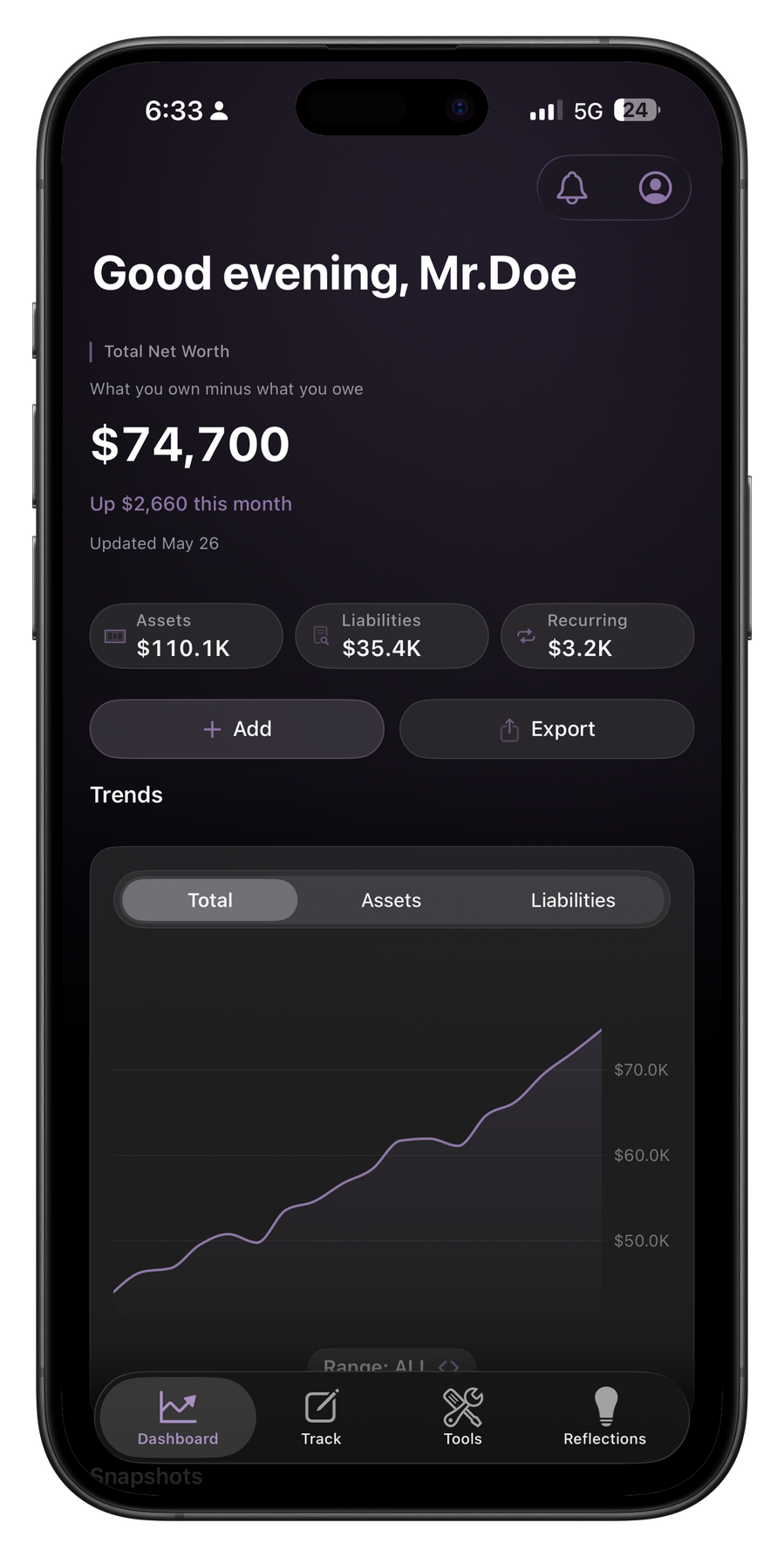
Your Complete Financial Picture
Track what you own, what you owe, and what you’re building. Manual by design. Private by default. No bank connections, ever.
Track
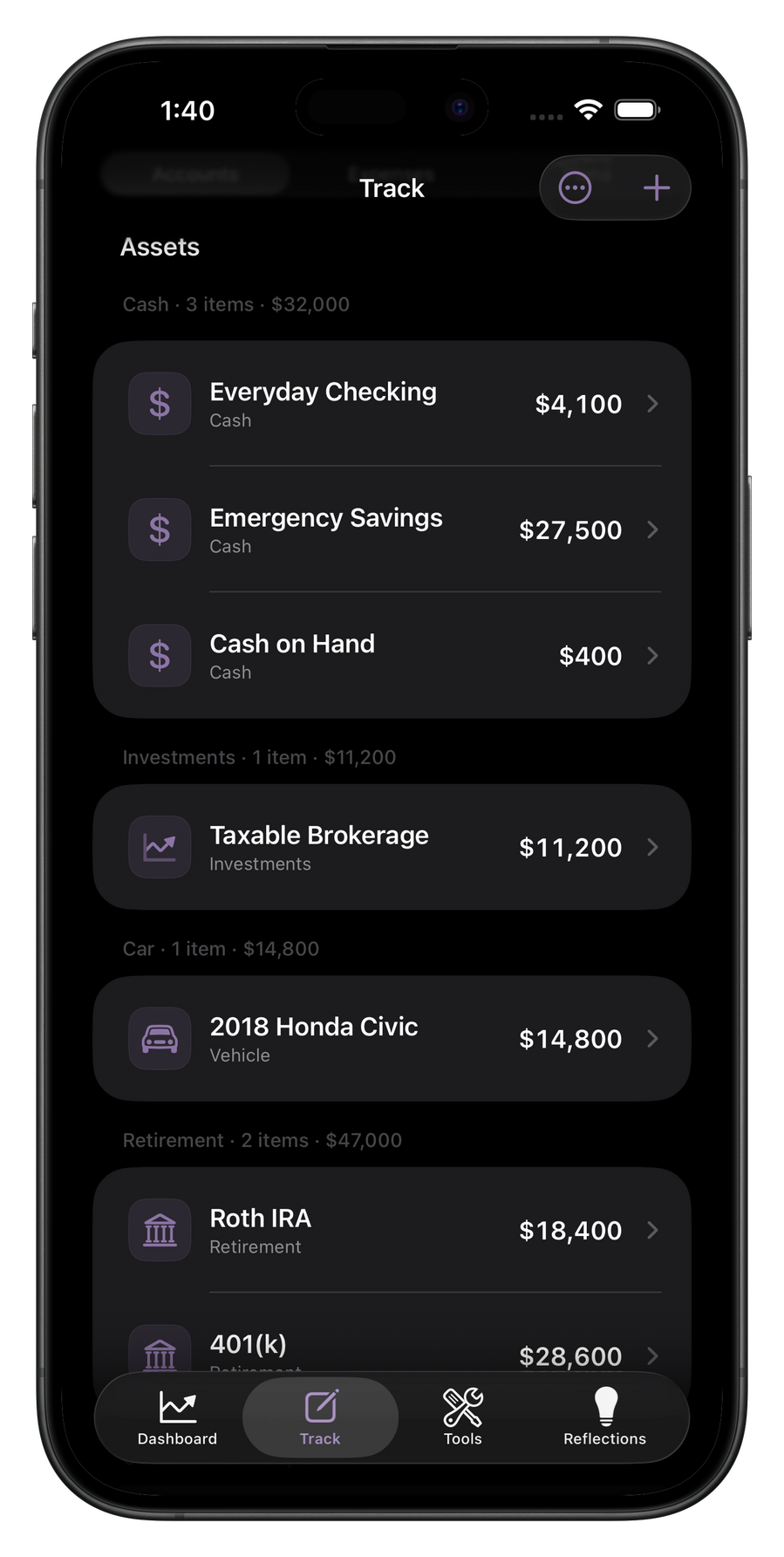
Everything you own and owe, in one place.
Add your accounts, investments, and debts manually. Arc Wealth builds your complete net worth picture from what you actually enter. Nothing is connected. Nothing is automatic. Everything is deliberate.
Expenses
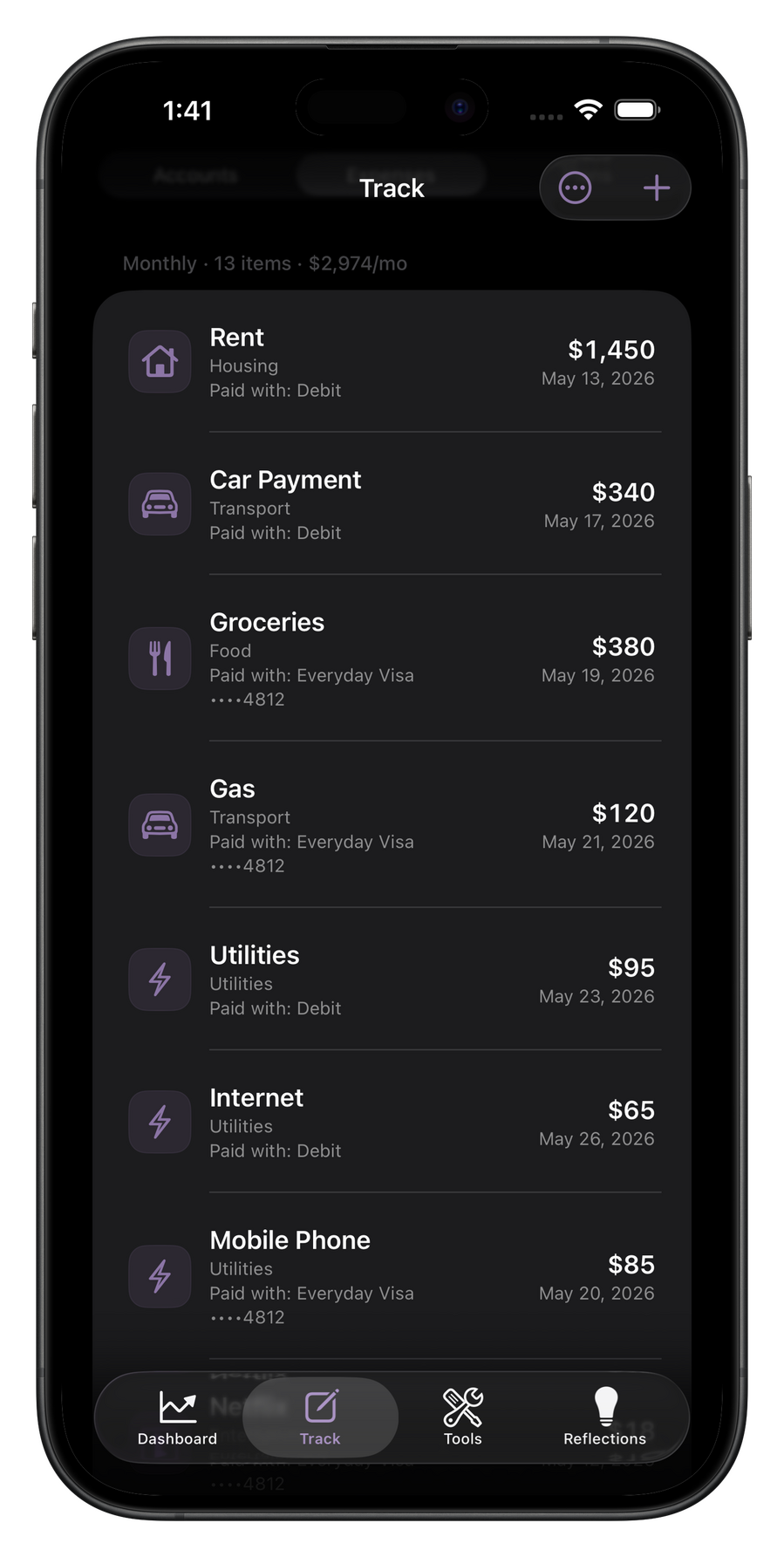
See what the month is already asking for.
Log your recurring bills and subscriptions once. Arc Wealth shows you your committed monthly expenses so you always know what is already spoken for, and what room remains for everything else.
Plans
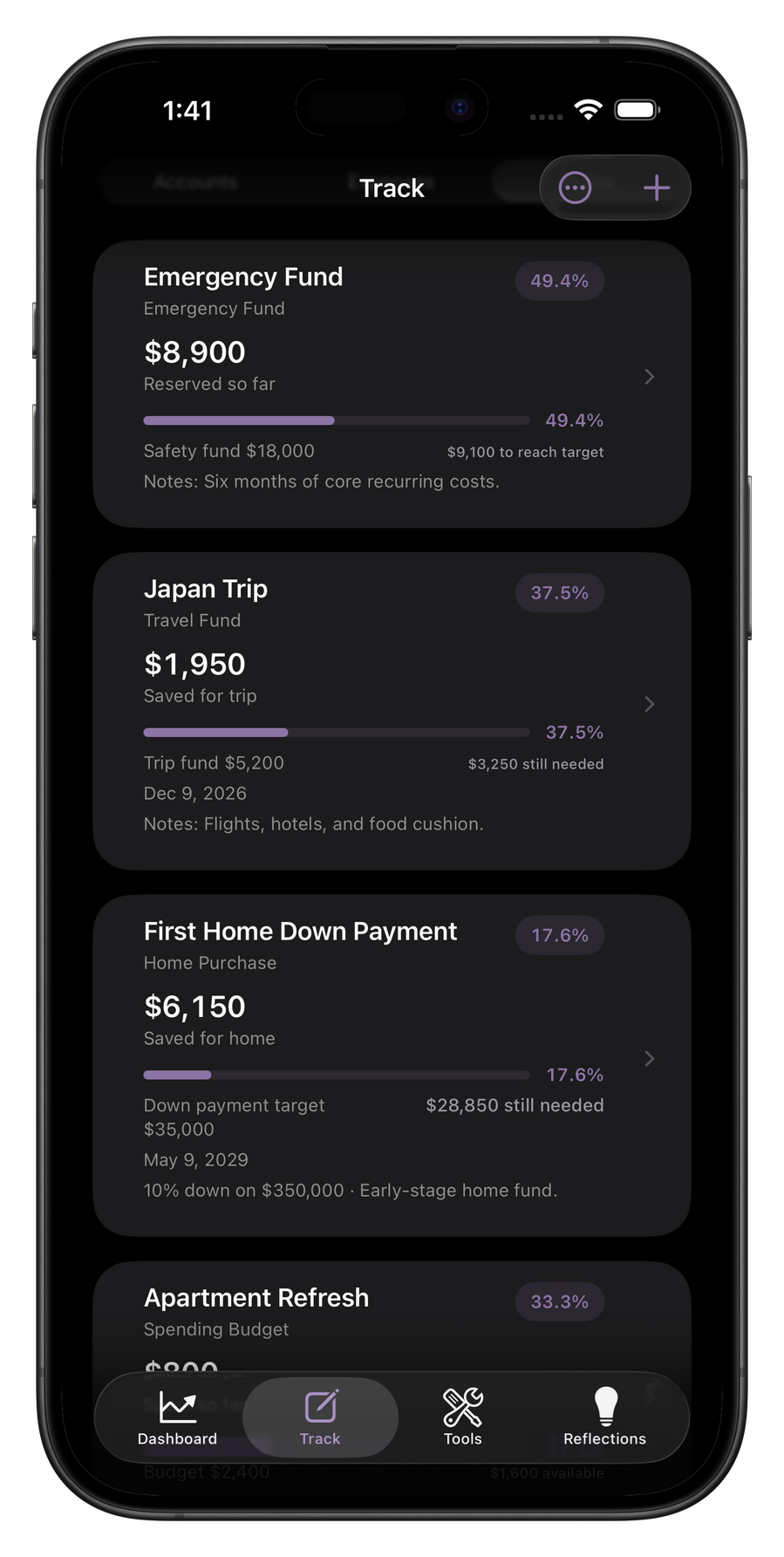
Give your savings a destination.
Create savings goals and spending budgets. Track progress over time. Arc Wealth shows you where each plan stands without directing you on what to do with it.
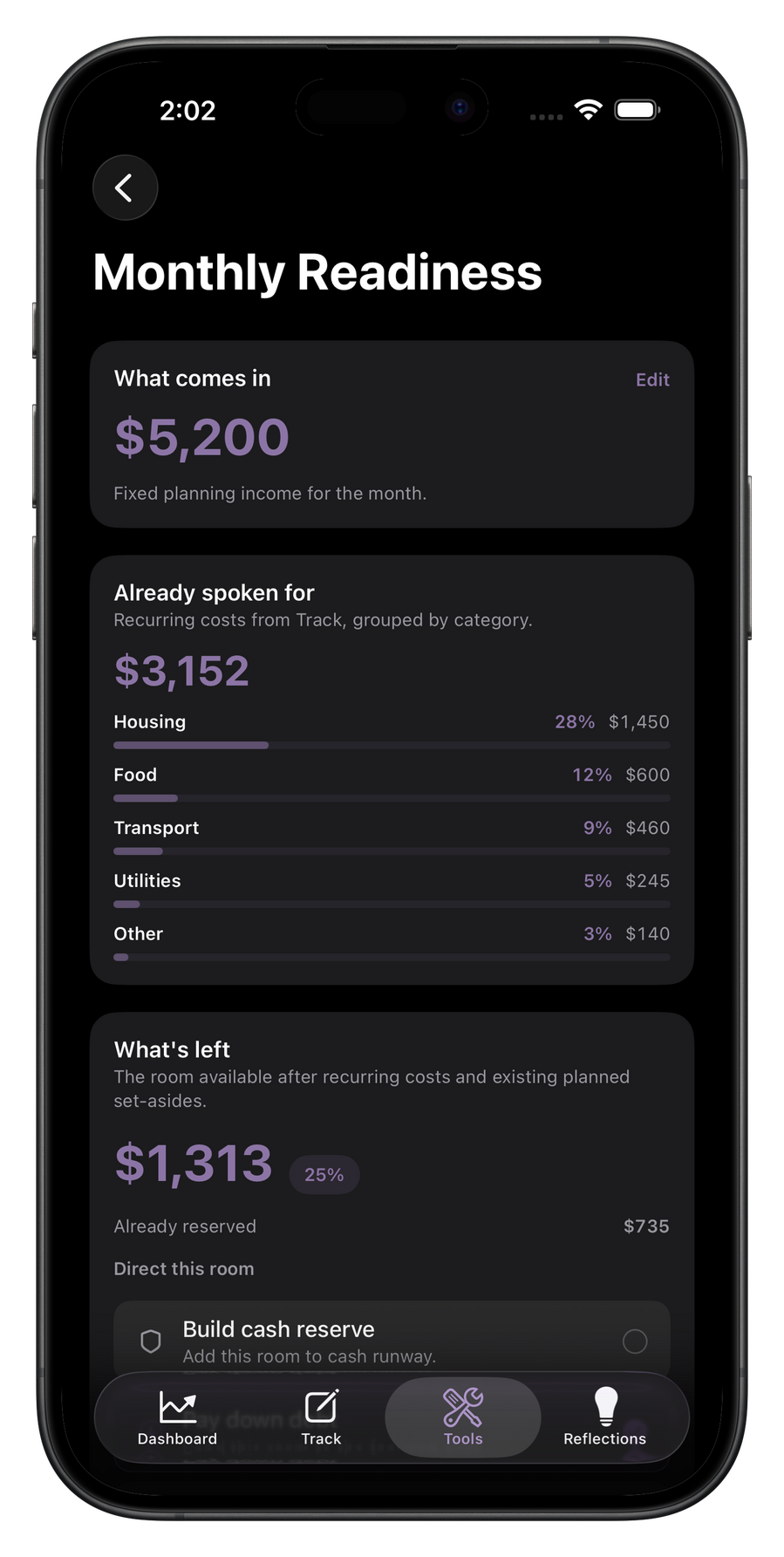
Tools
Quiet tools for planning ahead.
Monthly Readiness shows what is spoken for and what remains open. Debt Paydown shows what extra payments can change. Wealth Projection models where the current path could lead.
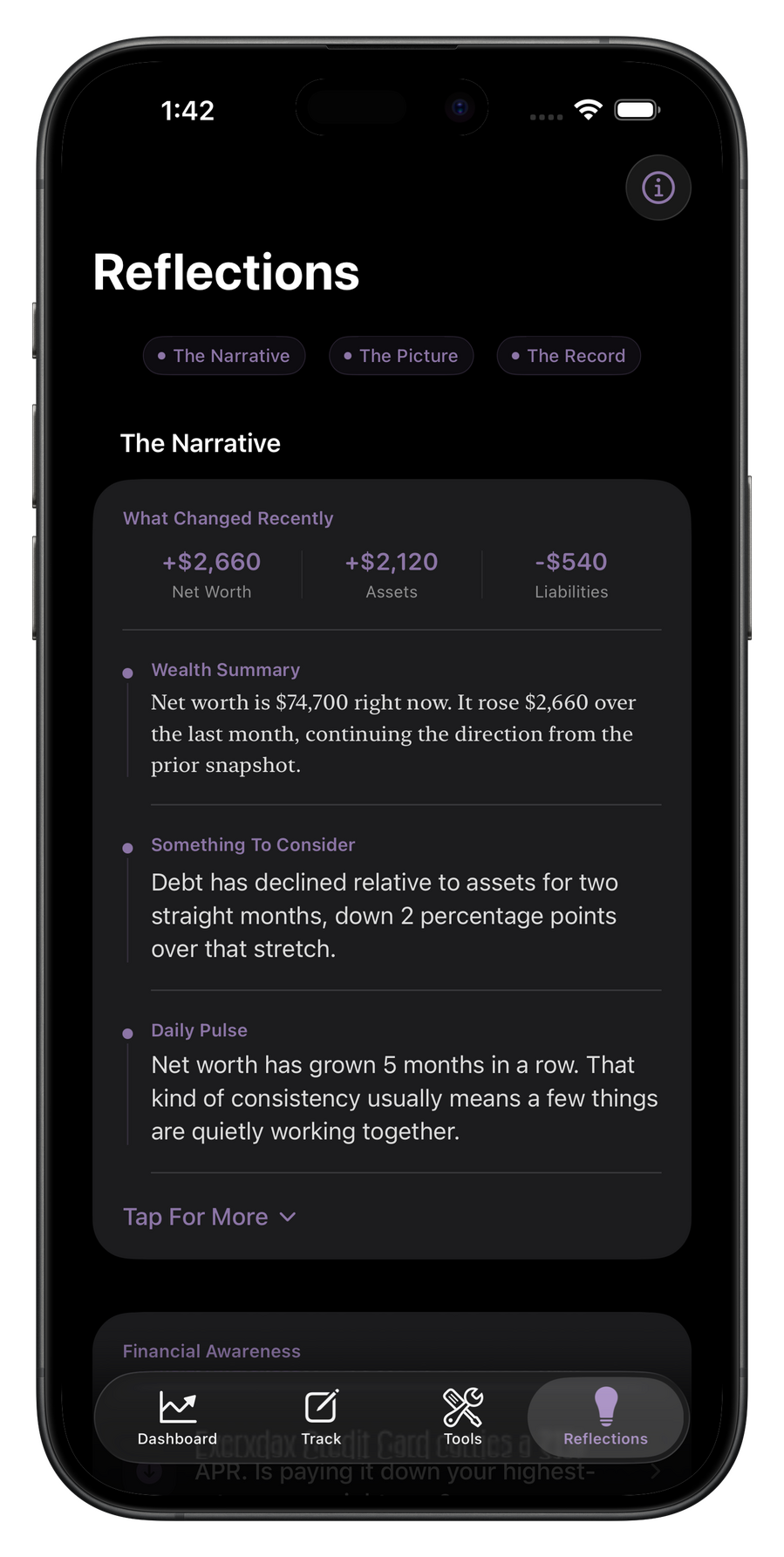
Reflections
The Narrative
Reflections turns the data you’ve tracked into a calm, personal narrative. What changed, what held steady, and what may deserve a closer look next.
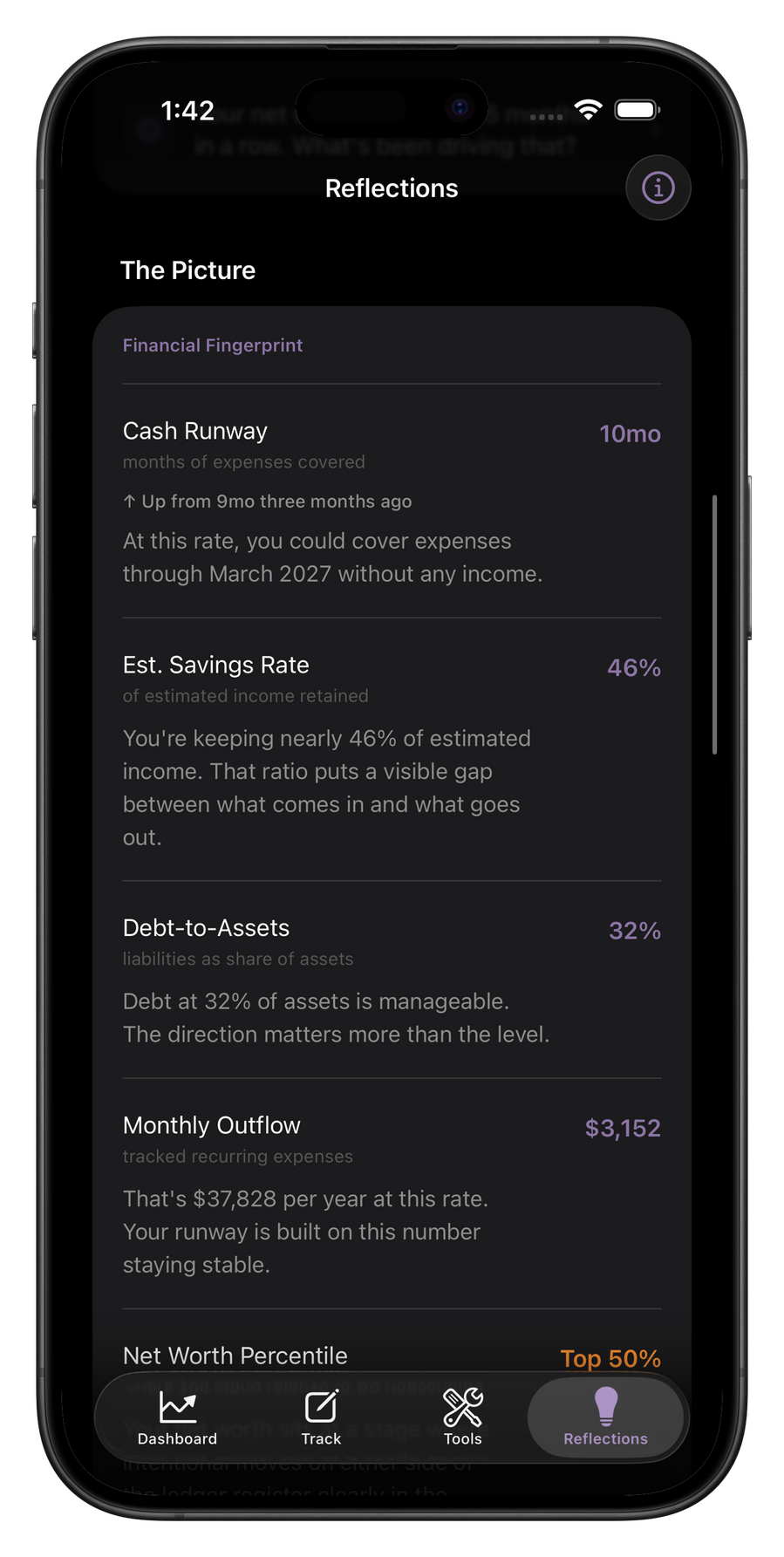
The Picture
Asset mix, debt relative to assets, recurring outflow, savings pace, and cash runway. The Picture brings the shape of your finances into focus without turning it into noise.
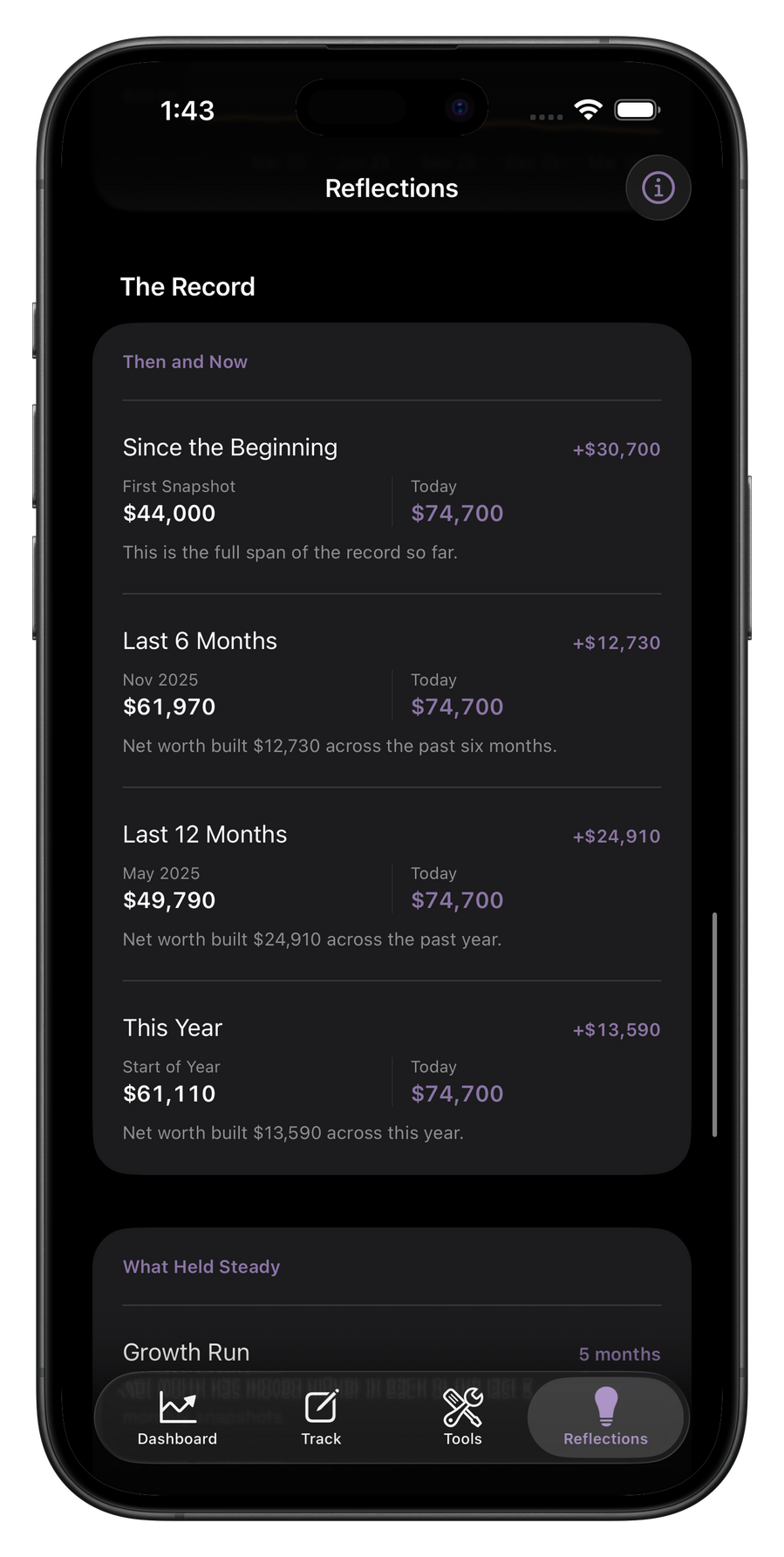
The Record
Track the movement over time, from longer stretches to recent progress. The Record keeps the milestones, direction, and pace of change in one place.
Free
Use locally with no account required
Dashboard and net worth tracking
Up to 7 tracked accounts, assets, and liabilities
Up to 7 recurring expenses
1 plan
Up to 10 notes
Complete Net Worth widget
iCloud Sync and Face ID support
Premium
Everything in Free
Unlimited accounts, expenses, and plans
Unlimited notes
Full Reflections
Tools: Monthly Readiness, Debt Paydown, Wealth Projection
Exports, premium widgets, custom labels, premium palettes, Monthly Letters, milestone alerts, and extended history
Your financial picture starts here.
Free to download. No account required. No bank connections. Just open and begin.
Privacy Policy
Privacy Policy for Arc Wealth
Last updated: May 8, 2026Arc Wealth is a private, manual-entry wealth tracking app by ClearStone.
Arc is designed so your financial library stays under your control.1. What Arc Wealth Stores
Arc Wealth may store the information you choose to enter in the app, including:
- Account names, balances, assets, liabilities, and history
- Recurring expenses and payment labels
- Plans, goals, contributions, notes, and reflections
- Monthly planning information, including planning income if you choose to add it
- App settings such as currency, theme, notification preferences, and privacy preferences
- Optional profile information such as display name, birth year, and Sign in with Apple account identifierArc Wealth does not ask for bank login credentials. Arc Wealth does not connect to financial institutions. Arc Wealth does not store card numbers.2. Local Storage
By default, your Arc data is stored on your device.
Arc Wealth stores your library as encrypted app data using Apple platform security features. The encryption key is stored in the device Keychain. Your data is not sent to ClearStone servers.3. iCloud Sync
If you choose to turn on iCloud Sync, Arc Wealth stores a copy of your Arc library in your private iCloud account using Apple CloudKit.
iCloud Sync is optional. If iCloud Sync is off, Arc Wealth remains local to your device.
When iCloud Sync is enabled, your Arc library may be uploaded to and downloaded from Apple’s iCloud infrastructure so it can stay available across your Apple devices. ClearStone does not operate a separate server for Arc library sync.
You can turn off iCloud Sync in Arc settings. You can also delete the iCloud copy from Arc settings when that option is available.4. Sign in with Apple
Arc Wealth supports Sign in with Apple.
If you sign in with Apple, Arc Wealth may store the Apple user identifier provided by Apple, and may store your Apple-provided email or name if Apple provides it and you choose to use it. Arc Wealth uses this information only to identify the Arc library that belongs to that Apple account.
Arc Wealth does not receive your Apple ID password.
If you sign out, Arc Wealth may preserve the local library on your device and require the same Apple account to sign back in before opening that library again. If you delete your account in Arc settings, that deletes the local Arc profile and Arc data available to the app, including the iCloud library copy when deletion everywhere is selected or required by the account flow.
To stop using Sign in with Apple for Arc Wealth at the Apple account level, remove Arc Wealth from your Apple Account settings.5. Purchases and Subscriptions
Arc Premium purchases are handled by Apple through StoreKit.
Arc Wealth does not receive or store your payment card number. Apple processes purchases, renewals, cancellations, refunds, and subscription management.
Arc Wealth stores only the subscription entitlement state needed to unlock Premium features in the app.6. Notifications
Arc Wealth can send local notifications if you allow them.
Notifications may include reminders related to items you track in Arc Wealth, such as recurring expenses, important dates, plans, reflections, or milestones. These notifications are scheduled on your device through Apple’s notification system.
You can change notification permissions in iOS Settings and Arc settings.7. Face ID and Passcode
Arc Wealth can use Face ID, Touch ID, or device passcode through Apple’s LocalAuthentication framework for app privacy features.
Arc Wealth does not receive, store, or access your biometric data. Biometric authentication is handled by iOS.8. Widgets
Arc widgets use a limited snapshot of your Arc data so widgets can display useful information outside the app.
Widget data is stored locally using the app group shared between Arc Wealth and its widget extension. If privacy hiding is enabled, Arc writes hidden values for supported widget surfaces.9. Data Sharing
ClearStone does not sell your personal data.
Arc Wealth does NOT use third-party analytics SDKs, advertising SDKs, tracking SDKs, or data brokers.
Arc Wealth does not share your financial data with banks, advertisers, or analytics providers.
Your data may be handled by Apple services when you use Apple-provided features such as iCloud Sync, Sign in with Apple, StoreKit, notifications, widgets, or biometric authentication. Apple’s handling of that data is governed by Apple’s privacy policies and system settings.10. Support Requests
If you contact ClearStone for support, we may receive the information you choose to send, such as your email address, message content, screenshots, or diagnostic context you voluntarily provide.
Support information is used only to respond to your request and improve support quality.
Do not send sensitive financial details in support messages unless needed for your request.11. Data Deletion
You can delete Arc data from within the app.
For local users, deleting the local profile or erasing data removes Arc data from the device according to the selected action.
For Sign in with Apple users, deleting the account returns Arc to onboarding and deletes Arc data available to the app. If an iCloud copy exists or iCloud Sync is enabled, Arc Wealth can also delete the iCloud library copy.
Deleting the app from your device may remove local app data, subject to iOS behavior and your iCloud settings.12. Children
Arc is not designed for children and is not intended for use by children under 13.13. Security
Arc Wealth is designed to minimize data movement.
Local Arc data is encrypted before it is written to app storage. The local encryption key is stored in the device Keychain. Arc uses Apple frameworks for iCloud Sync, Sign in with Apple, StoreKit purchases, notifications, widgets, and biometric authentication.
No method of storage or transmission can be guaranteed to be perfectly secure, but Arc Wealth is designed to avoid unnecessary collection and transmission of your financial information.14. Changes to This Policy
ClearStone may update this Privacy Policy from time to time. If changes are material, we will update the date above and may provide notice in the app or through the App Store listing.15. Contact
If you have questions about this Privacy Policy or your data, contact:
[email protected]
Terms Of Use
Terms of Use for Arc Wealth
Last updated: May 8th, 2026These Terms of Use govern your use of Arc Wealth, an iOS application published by ClearStone. By downloading, accessing, or using Arc Wealth, you agree to these Terms. If you do not agree, do not use Arc Wealth.These Terms of Use apply in addition to Apple’s standard Licensed Application End User License Agreement, which governs your licensed use of the app through the App Store.1. About Arc Wealth
Arc Wealth is a private, manual-entry wealth tracking application for personal use.
Arc Wealth helps you record and review financial information you choose to enter, including accounts, assets, liabilities, recurring expenses, plans, notes, and related outputs. Arc Wealth is a tool for personal financial organization and reflection. It does not provide financial advice, investment advice, tax advice, accounting services, or legal advice.
Nothing in Arc Wealth, including summaries, calculations, projections, reflections, insights, comparisons, or other output, should be interpreted as a recommendation to buy, sell, hold, contribute to, repay, or otherwise act on any financial asset, account, instrument, or obligation. Projections and calculations are illustrative only and depend entirely on the data you enter and the assumptions you choose. You are solely responsible for your financial decisions.
If you need financial, tax, legal, or investment advice, consult a qualified professional.2. Eligibility
Arc Wealth is not designed for or intended for use by children under 13.
By using Arc Wealth, you confirm that you are at least 13 years old. If you are under 18, you confirm that you have permission from a parent or guardian to use the app.3. Local Use and Apple Account Use
Arc Wealth supports both local-first use and Sign in with Apple.
If you use Arc Wealth locally without an account, your Arc library remains associated with your device and local profile unless you choose to enable iCloud Sync or otherwise sign in.
If you use Sign in with Apple, your Arc profile and Arc library access may be associated with your Apple account. You are responsible for maintaining access to your Apple account and trusted devices. If you lose access to the Apple account associated with your Arc profile, ClearStone may be unable to restore access to your Arc library.
ClearStone does not have access to your Apple login credentials and cannot recover Apple account access on your behalf.4. Arc Free and Arc Premium
Arc Wealth offers a free tier and an optional premium subscription tier.Arc Free:
Arc Free includes core features with certain usage limits. As of the date above, Arc Free includes:- Up to 7 active tracked assets and liabilities
- Up to 7 recurring expenses
- 1 plan
- Up to 10 notes
- Certain features may also be limited, read-only, teaser-based, or unavailable on Arc Free.Arc Premium:
Arc Premium is an auto-renewing subscription available through Apple’s in-app purchase system. Premium features may include, depending on the current version of the app:- Full Reflections access
- Monthly Readiness
- Debt Paydown
- Wealth Projection
- Exports and PDF reports
- Premium widgets
- Custom category labels
- Premium accent palettes
- Monthly Letters
- Milestone alerts
- Higher tracking limits
- Expanded history and other premium functionalityPremium features may change over time as Arc Wealth evolves.Billing and Renewal:
Arc Premium subscriptions are billed by Apple to your Apple ID account at the time of purchase and renew automatically unless canceled at least 24 hours before the end of the current billing period.
You can manage or cancel your subscription at any time in your Apple ID account settings.
Any free trial or introductory offer, if available, will be disclosed at the time of purchase. Any unused portion of a free trial is forfeited if you purchase a subscription before the trial ends.
Refunds are governed by Apple’s policies. ClearStone does not issue refunds directly.Downgrades:
If your Arc Premium subscription ends, Arc Wealth may return to Arc Free behavior immediately. Data created while subscribed is generally preserved, but some features may become locked, read-only, limited, or unavailable unless you re-subscribe.5. Your Data
Your Arc library, including the information you manually enter into Arc Wealth, belongs to you.
By default, Arc Wealth stores your library locally on your device in encrypted form. ClearStone does not operate a general-purpose cloud database for your financial library and does not store your manually entered financial data on ClearStone servers.
If you enable iCloud Sync, your Arc library may be stored in your private iCloud account using Apple services, including CloudKit. In that case, Apple’s terms and privacy practices also apply to those synced records.
Arc Wealth does not connect to financial institutions and does not request or store bank login credentials.
Your use of Arc Wealth is also governed by the Arc Wealth Privacy Policy, which is incorporated into these Terms by reference.6. Account Deletion, Local Reset, and Data Removal
Arc Wealth may provide options to delete your local profile, erase local data, sign out, or delete your account, depending on how you use the app.
If you use Arc Wealth locally, deleting your local profile or local data may permanently remove your Arc library from that device.
If your Arc profile uses Sign in with Apple, deleting your account may remove the local Arc profile and data available to the app. If an iCloud copy exists or iCloud Sync is enabled, deletion may also remove the iCloud copy and other Arc data the app can reach through Apple’s services.
These actions may be irreversible. You are responsible for reviewing in-app confirmations carefully before proceeding.7. Acceptable Use
You agree to use Arc Wealth only for lawful personal purposes consistent with these Terms.You agree not to:- Reverse engineer, decompile, disassemble, or otherwise attempt to access the source code of Arc Wealth, except where prohibited by applicable law
- Modify, adapt, translate, or create derivative works based on Arc Wealth
- Use Arc Wealth for unlawful, fraudulent, or deceptive purposes
circumvent or attempt to circumvent feature restrictions, subscription gates, security measures, or access controls
- Use Arc Wealth in a way that violates any applicable law or regulation8. Intellectual Property
Arc Wealth, including its software, design, interface, text, graphics, branding, and other original content created by ClearStone, is owned by ClearStone or its licensors and protected by applicable intellectual property laws.
These Terms do not transfer ownership of Arc Wealth or any ClearStone intellectual property to you.9. Third-Party Services and Apple Services
Arc Wealth relies on Apple-provided frameworks and services, which may include:- StoreKit
- Sign in with Apple
- iCloud and CloudKit
- Widgets
- Local notifications
- Biometric or device authenticationYour use of those services may also be subject to Apple’s terms, policies, and service availability. ClearStone is not responsible for Apple’s services or for downtime, interruption, or unavailability caused by Apple or your device environment.10. Disclaimer of Warranties
Arc Wealth is provided on an “as is” and “as available” basis, to the fullest extent permitted by applicable law.
ClearStone makes no warranties, express or implied, regarding Arc Wealth, including any implied warranties of merchantability, fitness for a particular purpose, non-infringement, accuracy, reliability, or availability.
ClearStone does not warrant that Arc Wealth will be uninterrupted, error-free, secure, or free of bugs or vulnerabilities, or that any calculation, projection, reflection, or other output will be accurate, complete, or suitable for your needs.11. Limitation of Liability
To the fullest extent permitted by applicable law, ClearStone will not be liable for any indirect, incidental, special, consequential, exemplary, or punitive damages arising out of or related to your use of Arc Wealth.This includes, without limitation:- Loss of data
- Loss of access to your Arc library
- Interruption of service
- Subscription issues handled by Apple
- Financial decisions made based on app content or outputTo the fullest extent permitted by law, ClearStone’s total liability for any claim arising from or related to Arc Wealth or these Terms will not exceed the greater of:the amount you paid to ClearStone through Apple for Arc Premium in the 12 months before the claim arose, or
USD $10
Some jurisdictions do not allow certain limitations or exclusions, so some of the above may not apply to you.12. Governing Law
These Terms are governed by the laws of the State of Florida, United States, without regard to conflict of law principles, except to the extent that applicable consumer protection law requires otherwise.
Any dispute arising from these Terms or your use of Arc Wealth will be brought in a court of competent jurisdiction in Florida, unless applicable law requires another forum.13. Changes to These Terms
ClearStone may update these Terms from time to time.
If changes are material, ClearStone may update the date above and may provide notice through the app, on the website, or through the App Store listing. Your continued use of Arc Wealth after updated Terms take effect constitutes acceptance of the revised Terms.14. Termination and Discontinuation
You may stop using Arc Wealth at any time by discontinuing use of the app or deleting it from your device.
ClearStone may suspend, modify, or discontinue Arc Wealth, in whole or in part, at any time. Where practical, ClearStone may provide notice of material discontinuation. Discontinuation of the app does not automatically delete data stored on your device or in your iCloud account.15. Contact
If you have questions about these Terms of Use, contact:[email protected]